A growing design agency in Asia had an active blog pulling consistent search traffic month after month. New articles were ranking. Older pages were holding their positions. Then eleven specific pages began slipping in Google Search Console, losing clicks week after week.
The content on these pages was not old or thin. The articles were current and useful. A quick audit found no technical SEO issues: no indexing blocks, no broken internal links, no page speed problems. The single shared weakness across every declining page was the meta title tag.
All eleven titles were rewritten on May 18, 2026 using five repeatable rules. Nothing else on any page changed. The sections below explain the diagnosis, the fix, the results, and how to do this on your own site.
Quick Facts
| Metric | Value |
|---|---|
| Pages tested | 11 |
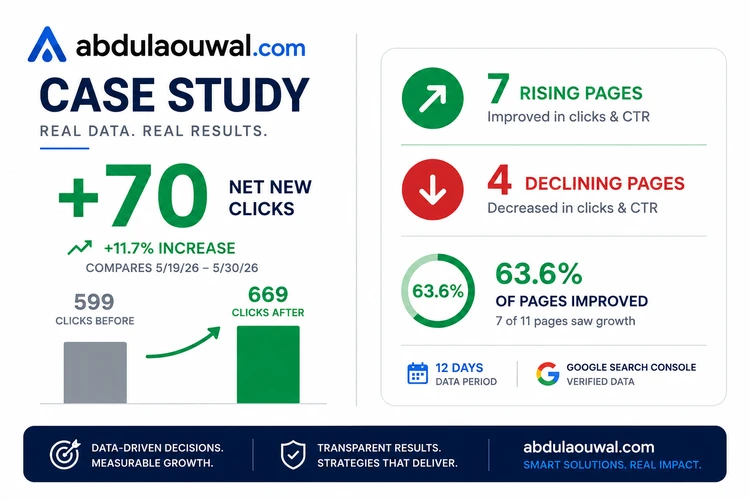
| Pages that improved | 7 (64%) |
| Pages that declined | 4 (36%) |
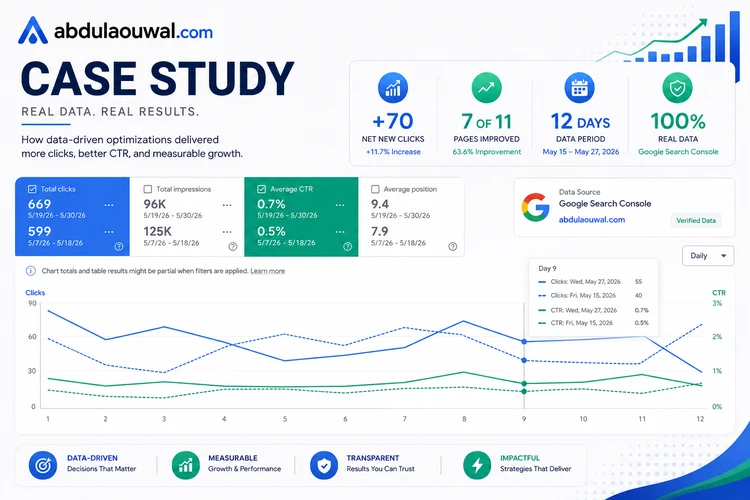
| Total clicks before | 599 |
| Total clicks after | 669 |
| Net click change | +70 |
| Traffic growth | +11.7% |
| Fix applied | Meta title rewrite only |
| Time to results | 12 days |
| Data source | Google Search Console |
The Diagnosis: Why Weak Meta Titles Cause Search Traffic Decline
Key question: If the content was still good, why were search engines sending fewer people to these pages?
A meta title is the blue clickable text shown in Google search results. It sits inside the <title> HTML tag of every webpage. Search engines read the title first to understand what the page is about. A person scanning results reads it to decide whether to click.
A weak title fails on both sides. It tells Google the wrong thing about the page. And even when the page does show up, fewer people click on it.
Finding: The eleven pages shared three title problems. First, the main keyword sat behind filler words in the middle or end of the title. Search engines give more weight to the first few words, so the key term arrived too late to help.
Second, no title had a year. Without a year, each page looked old next to newer titles from other sites. Third, no title named its audience. The page had to fight every other result instead of standing out for its actual readers.
The Fix: Five Meta Title Rules That Reversed the Decline
Every title was rewritten using the same five rules. No technical knowledge is needed. Each rule takes under one minute per page.
- Rule 1: Front-load the primary keyword. Search engines scan titles left to right. The first three to four words carry the most ranking weight. A keyword at position seven has far less power than one at position one. Move the main term to the first four words of the title.
- Rule 2: Append the current year. A year like 2026 shows both Google and readers the page is fresh. This matters for any topic where information changes over time. A title without a year competes from a weaker position.
- Rule 3: Insert the audience term. Phrases like "for Graphic Designers" or "for Beginners" cut the competition. Instead of fighting every page on a broad topic, the title points to the group your content is meant for.
- Rule 4: Delete filler words. Strip phrases that have no search ranking value: "How to," "A Guide to," "Read Before You Hire," "Get Ideas From." These words push the real keyword away from the front. They waste the limited character space of a title tag.
- Rule 5: Standardize separators. Choose one separator style, colon or pipe, and apply it consistently across all pages. A uniform pattern makes your titles easy to read for both search engines and people scanning results.
Title Structure Changes: Original vs. Optimized (Pattern View)
Pattern: The table below shows how the five meta title rules restructured each title. Specific words are replaced with placeholders to protect client identity. The left column shows the original structure. The right column shows the optimized structure with the dominant rule applied.
| Original Title Structure | Optimized Title Structure | Dominant Rule |
|---|---|---|
| [Number] [Topic] to Get Ideas From | [Number] [Topic] Design Template [Year] | Rule 1 + 2 |
| [Topic]: Tools, Workflows, & Uses | [Topic] for [Audience]: Tools, Workflows, & Uses | Rule 3 |
| [Topic]: Features & Criticisms | [Topic]: Trend & Design | Rule 1 + 4 |
| Master [Topic] in [Year]: Tips & Patterns | [Primary Keyword]: Tips & Patterns | Rule 1 + 4 |
| How to [Topic] for [X] | [Topic] Design Guide | Rule 1 + 4 |
| [Topic]: A Guide to [X] | [Topic] Design: [X] Guide | Rule 1 |
| [Topic] Trend [Year]: Catchphrase! | [Topic] Trends [Year]: Catchphrase | Rule 5 |
| [Number] [Topic]: Should Know in [Year] | [Number] [Topic]: Names & Guide | Rule 4 |
| [Topic] Cost & Pricing: Read Before You Hire | [Topic] Cost & Development Pricing | Rule 1 + 4 |
| [Topic]: How to [X] in [Context] | [Topic] & Style Guide for [Audience] | Rule 1 + 3 |
| [Product] Review [Year]: Evaluation, Pricing & Uses | [Product] [Year]: Review & Pricing | Rule 1 + 2 |
The Results: Before vs. After GSC Clicks and CTR
Each row below is one page. Only the <title> tag was changed. The article body, images, and internal links stayed the same on every page. Data is from Google Search Console, tracked May 19 to May 30, 2026.
| Page | Clicks Before | Clicks After | Change | CTR Before | CTR After | Status |
|---|---|---|---|---|---|---|
| 1 | 49 | 57 | +8 | 0.7% | 1.0% | Rising |
| 2 | 42 | 59 | +17 | 1.2% | 1.4% | Rising |
| 3 | 8 | 31 | +23 | 0.4% | 1.4% | Rising |
| 4 | 10 | 15 | +5 | 0.2% | 0.5% | Rising |
| 5 | 23 | 32 | +9 | 1.7% | 2.3% | Rising |
| 6 | 53 | 54 | +1 | 1.0% | 1.1% | Rising |
| 7 | 9 | 7 | -2 | 0.5% | 0.3% | Declining |
| 8 | 170 | 202 | +32 | 0.9% | 1.2% | Rising |
| 9 | 9 | 4 | -5 | 0.1% | 0.1% | Declining |
| 10 | 222 | 207 | -15 | 0.6% | 0.6% | Declining |
| 11 | 4 | 1 | -3 | 0% | 0% | Declining |
Why Four Pages Did Not Improve
Two declining pages had very low search volume to begin with. A better meta title cannot create clicks where no one is searching. These pages need content that matches what real people search for, not just a title rewrite.
The other two declining pages had higher search volume but deeper problems. Likely reasons include thin content, slow page load speed, or stronger pages from bigger sites. The title fix worked as a test. Pages that did not respond need a deeper look at their content, speed, or competition.
Takeaways: Three Lessons From This SEO Case Study
- Declining pages are the fastest SEO win. Pages that are losing clicks already rank for something. A small change to their meta title can turn them around fast. You do not need new content or links to see results.
- Title rules are simple and repeatable. You do not need tools or deep knowledge. Five checks in one minute per page gave a clear result in twelve days.
- Always check both sides of the data. Seven pages improved. Four did not. Knowing which pages did not respond tells you where to look next: content depth, page speed, or competition strength.
How to Do This Yourself: Step-by-Step Guide Using GSC
Step 1: Find Your Declining Pages
Open Google Search Console and go to the Performance report. Set the date range to the last three months. Click the Pages tab. Sort by click difference with the largest drop first.
The pages at the top of this list are losing the most clicks. These pages are the best ones to start with.
Step 2: Score Each Meta Title Against the Five Rules
Open each page in a browser. Read the tab text at the top of the window. That text is the meta title. Ask five simple yes or no questions about it.
Is the main keyword in the first four words? Is the current year there? Does the title name a specific audience?
Are filler words removed? Is the separator style the same as other pages on the site?
If you answer "no" to three or more of these, rewrite the title.
Step 3: Rewrite, Publish, and Wait Twelve Days
Apply the five rules to each weak title. Do not change anything else on the page. No content edits, no image swaps, no new links. Just change the title and publish.
Wait twelve days. This gives Google time to re-read the titles and collect new click data. Then go back to GSC and set the date to the last two weeks.
Compare clicks, impressions, and CTR for each page. Pages that went up: the title was the problem. Pages that did not: you need to check deeper things like content quality, page speed, or competitor strength.
Need help finding and fixing declining pages on your own site? Get a free technical SEO audit.