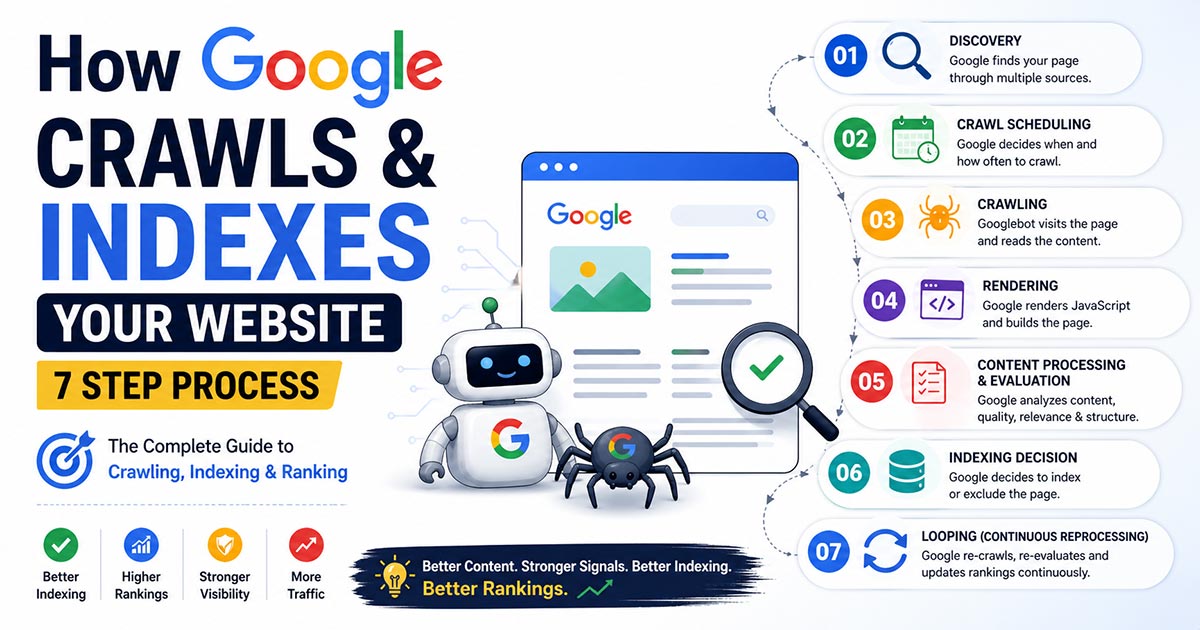
Most homepages look good to users, but search engines like Google may not clearly understand what the site is about. Design alone is not enough. Without proper structure, your homepage can send mixed signals about whether it is a store, blog, or service.
Your homepage should clearly define your website type using the right schema. This helps search engines understand your content better and show it correctly in results. In this guide, you will learn different homepage types and the correct schema for each one.
What Is Homepage Schema and Why It Matters
Schema.org is a shared vocabulary used to describe your website in a structured way. Instead of guessing, search engines like Google can read clear labels such as store, blog, or software and understand your site’s purpose.
Homepage schema is different from inner pages because it defines your entire website, not just one piece of content. A product page describes a product, but the homepage tells whether your site is an OnlineStore, Organization, or something else.
Search engines use this data to classify your site and decide how it should appear in search results. When the schema matches your homepage intent, it improves accuracy, visibility, and eligibility for rich results.
How to Choose the Right Schema for Your Homepage
The schema you choose should match what your website actually does. If you sell products, it is a store. If you publish articles, it is a blog or news site. Focus on function, not appearance.
Design can look similar across sites, but purpose is different. A modern layout does not make it SaaS or ecommerce. The schema should reflect the core service your homepage represents.
Use one main schema type for your homepage. This helps search engines like Google clearly understand your site without confusion.
Quick Rules
- Choose schema based on your main business model
- Do not mix multiple primary types on homepage
- Match schema with visible content
- Keep supporting schema relevant and minimal
Homepage Types and Their Schema
Below are the most common homepage types and the correct schema for each. Each section follows the same structure so you can easily identify what fits your website.
Ecommerce Homepage
An ecommerce homepage is built to sell products online. It shows product categories, featured items, and deals to drive sales.
Primary schema: OnlineStore
Supporting schema: Product, Offer, AggregateRating
Example: Amazon
<script type="application/ld+json">
{
  "@context": "https://schema.org",
  "@type": "OnlineStore",
  "name": "My Online Store",
  "url": "https://www.mystore.com",
  "makesOffer": {
    "@type": "Offer",
    "priceCurrency": "USD",
    "availability": "https://schema.org/InStock"
  }
}
</script>
SaaS Homepage
A SaaS homepage is designed to promote a cloud-based software product. It explains features, use cases, and pricing to encourage users to sign up or start a free trial. The focus is on solving problems and showing how the software delivers value to users.
Primary schema: SoftwareApplication
Supporting schema: WebApplication, Offer
Example: Slack
<script type="application/ld+json">
{
  "@context": "https://schema.org",
  "@type": "SoftwareApplication",
  "name": "My SaaS App",
  "applicationCategory": "BusinessApplication",
  "operatingSystem": "Web",
  "offers": {
    "@type": "Offer",
    "price": "10",
    "priceCurrency": "USD"
  }
}
</script>
Corporate Website
A corporate homepage represents a company and its overall brand. It focuses on services, company information, and trust signals to build credibility with customers and partners. The goal is to clearly communicate what the business does and how people can connect with it.
Primary schema: Organization
Supporting schema: ContactPoint, sameAs
Example: Uber
<script type="application/ld+json">
{
  "@context": "https://schema.org",
  "@type": "Organization",
  "name": "My Company",
  "url": "https://www.mycompany.com",
  "contactPoint": {
    "@type": "ContactPoint",
    "telephone": "+1-800-123-4567",
    "contactType": "customer service"
  },
  "sameAs": [
    "https://www.facebook.com/mycompany",
    "https://www.linkedin.com/company/mycompany"
  ]
}
</script>
Local Business
A local business homepage represents a physical location serving a specific area. It highlights address, opening hours, and services to attract nearby customers. The goal is to make it easy for people to find, contact, and visit the business.
Primary schema: LocalBusiness
Supporting schema: PostalAddress, OpeningHours
Example: Starbucks
<script type="application/ld+json">
{
  "@context": "https://schema.org",
  "@type": "LocalBusiness",
  "name": "My Local Shop",
  "address": {
    "@type": "PostalAddress",
    "streetAddress": "123 Main Street",
    "addressLocality": "Chattogram",
    "addressCountry": "BD"
  },
  "openingHours": "Mo-Su 09:00-21:00"
}
</script>
Blog / News Homepage
A blog or news homepage is built to publish articles and updates regularly. It highlights recent posts, categories, and featured stories to keep readers engaged. The goal is to deliver fresh content and establish authority through consistent publishing.
Primary schema: Blog or NewsMediaOrganization
Supporting schema: Article, Person
Example: The New York Times
<script type="application/ld+json">
{
  "@context": "https://schema.org",
  "@type": "Blog",
  "name": "My Blog",
  "url": "https://www.myblog.com",
  "blogPost": {
    "@type": "BlogPosting",
    "headline": "Sample Article Title",
    "author": {
      "@type": "Person",
      "name": "Author Name"
    }
  }
}
</script>
Educational Website
An educational homepage is designed to provide learning resources, courses, or academic programs. It highlights available subjects, lessons, and learning formats to guide users. The goal is to help students easily discover courses and understand how the platform delivers structured learning content.
Primary schema: EducationalOrganization
Supporting schema: Course, VideoObject
Example: Athabasca University
<script type="application/ld+json">
{
  "@context": "https://schema.org",
  "@type": "EducationalOrganization",
  "name": "My Learning Platform",
  "url": "https://www.mylearning.com",
  "hasCourse": {
    "@type": "Course",
    "name": "Digital Marketing Basics"
  }
}
</script>
Portfolio Website
A portfolio homepage is used by individuals to showcase their work, skills, and experience. It highlights selected projects and achievements to attract clients or employers. The goal is to present personal brand and credibility through real work examples.
Primary schema: Person
Supporting schema: CreativeWork
Example: Simon Pan
<script type="application/ld+json">
{
  "@context": "https://schema.org",
  "@type": "Person",
  "name": "Your Name",
  "url": "https://www.yourportfolio.com",
  "worksFor": {
    "@type": "Organization",
    "name": "Freelance"
  },
  "hasPart": {
    "@type": "CreativeWork",
    "name": "Project Title"
  }
}
</script>
Directory / Marketplace
A directory or marketplace homepage lists multiple businesses, services, or listings in one place. It helps users browse, compare, and choose options based on location, ratings, or category. The goal is to organize listings clearly and make discovery easy for users.
Primary schema: ItemList
Supporting schema: LocalBusiness, AggregateRating
Example: Airbnb
<script type="application/ld+json">
{
  "@context": "https://schema.org",
  "@type": "ItemList",
  "name": "Featured Listings",
  "itemListElement": [
    {
      "@type": "LocalBusiness",
      "name": "Sample Business",
      "aggregateRating": {
        "@type": "AggregateRating",
        "ratingValue": "4.5",
        "reviewCount": "120"
      }
    }
  ]
}
</script>
Event Website
An event homepage is designed to promote a specific event or multiple events. It highlights event details, schedule, location, and ticket options. The goal is to provide clear information and encourage users to register or purchase tickets.
Primary schema: Event
Supporting schema: Place, Offer
Example: Future Tech Expo
<script type="application/ld+json">
{
  "@context": "https://schema.org",
  "@type": "Event",
  "name": "Tech Conference 2026",
  "startDate": "2026-08-10",
  "location": {
    "@type": "Place",
    "name": "Convention Center"
  },
  "offers": {
    "@type": "Offer",
    "price": "50",
    "priceCurrency": "USD"
  }
}
</script>
Nonprofit Website
A nonprofit homepage represents an organization focused on social impact, charity, or community work. It highlights mission, programs, and ways to donate or get involved. The goal is to build trust and encourage support through transparency and clear communication.
Primary schema: Organization
Additional properties: nonprofitStatus, sameAs, contactPoint
Example: Vous Church
<script type="application/ld+json">
{
  "@context": "https://schema.org",
  "@type": "Organization",
  "name": "My Nonprofit",
  "url": "https://www.mynonprofit.org",
  "nonprofitStatus": "Nonprofit501c3",
  "sameAs": [
    "https://www.facebook.com/mynonprofit",
    "https://www.instagram.com/mynonprofit"
  ],
  "contactPoint": {
    "@type": "ContactPoint",
    "contactType": "donations",
    "email": "support@mynonprofit.org"
  }
}
</script>
Common Mistakes to Avoid
Many websites add schema but still get poor results because of simple mistakes. Using incorrect or misleading structured data can confuse search engines like Google and reduce trust. It is important to keep your schema accurate, consistent, and aligned with your actual homepage content.
- Using the wrong schema type for your homepage purpose
- Adding multiple primary entities on the same homepage
- Using fake ratings or misleading structured data
- Schema does not match visible content on the page
Quick Comparison Table
This table gives a quick overview of homepage types and their recommended schema. Use it to quickly match your website type with the correct structured data. For better understanding, you can also refer to the infographic below.
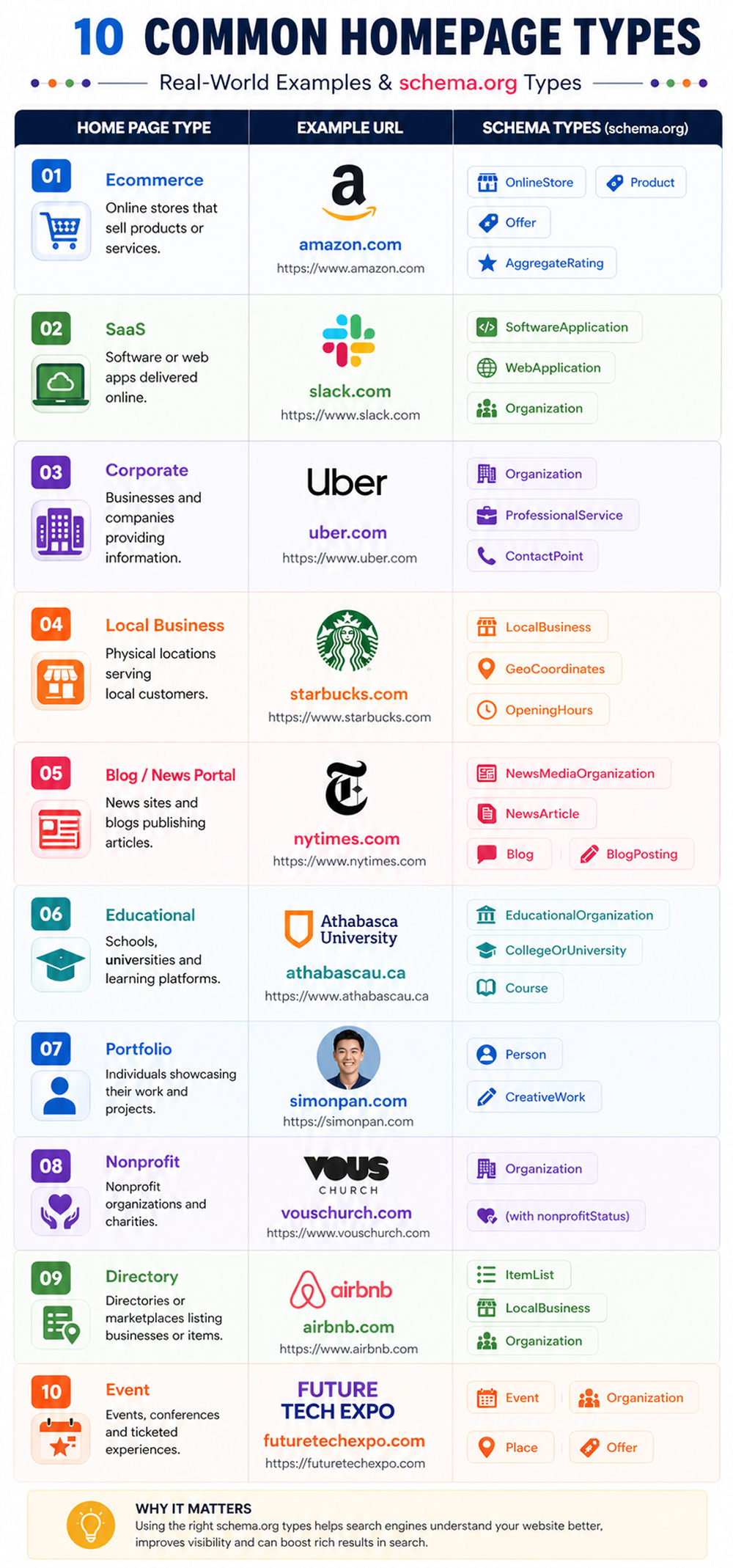
| Homepage Type | Primary Schema | Supporting Schema |
|---|---|---|
| Ecommerce | OnlineStore | Product, Offer, AggregateRating |
| SaaS | SoftwareApplication | WebApplication, Offer |
| Corporate | Organization | ContactPoint, sameAs |
| Local Business | LocalBusiness | PostalAddress, OpeningHours |
| Blog / News | Blog / NewsMediaOrganization | Article, Person |
| Educational | EducationalOrganization | Course, VideoObject |
| Portfolio | Person | CreativeWork |
| Directory | ItemList | LocalBusiness, AggregateRating |
| Event | Event | Place, Offer |
| Nonprofit | Organization | nonprofitStatus, ContactPoint |
Final Thoughts
Your homepage defines your website identity. It tells search engines what your site actually is, whether it is a store, service, or content platform. Getting this wrong can create confusion and reduce how accurately your site is understood.
Schema adds clarity to that identity. When you use the right type and keep it simple, search engines like Google can process your site more reliably. Focus on accuracy, match your content, and avoid unnecessary complexity.