Most SEO automation guides hand you a static list. Automate this task, do not automate that one. The problem is your site, your team size, and your risk tolerance are different from every other site that reads that same list. A one-size decision does not survive contact with reality. What you need is a decision framework, not a checklist. You need to know why a task belongs on autopilot, not just that someone else put it there.
The reversibility spectrum fills that gap. Every SEO task sits on a line. At one end are tasks that cost nothing to undo. At the other end are tasks that cost reputation, money, or trust if they go wrong. Where a task lands on that line determines how much automation it can safely carry. This article shows you how to place each task yourself.
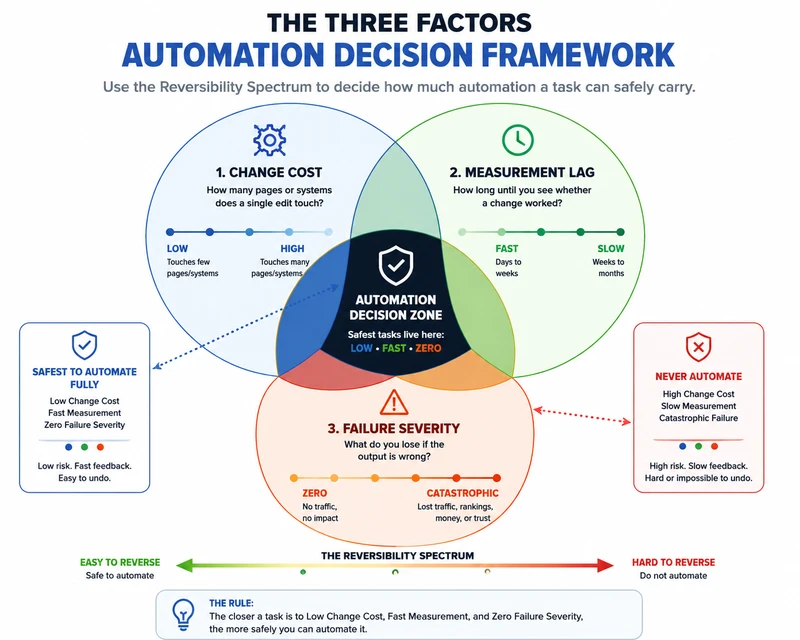
The Three Factors That Decide Automation Safety
Change cost
measures how many pages or systems a single edit touches. A meta description change hits one field in one template. A checkout flow change hits payment logic, auth, and user experience across multiple pages. A pagination fix touches one component. A sitewide noindex tag touches every page on the domain. The higher the blast radius, the more caution automation needs.
Measurement lag
measures how long until you see whether a change worked. A title rewrite shows CTR movement in two to four weeks. A schema update reflects in rich results within days. An architecture migration takes two to three months to stabilize. If the feedback loop is slow, the automation runs blind longer. Blind automation accumulates mistakes.
Failure severity
measures what you lose when the output is wrong. A bad ALT tag costs nothing. A wrong canonical points search signals at the wrong URL for weeks. A misplaced noindex removes an entire section from Google. The penalty ranges from zero to lost traffic, lost rankings, or lost trust.
What to Automate Fully
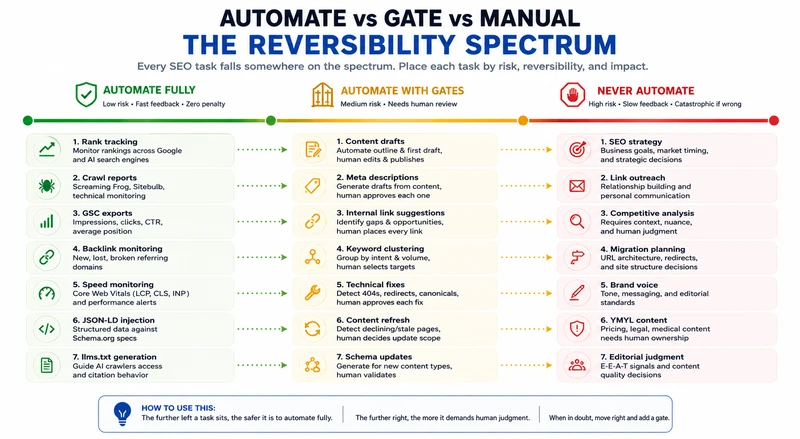
These tasks pass all three tests. Low change cost. Fast measurement. Zero failure penalty.
Monitoring and data collection
- Rank tracking across Google and AI search engines
- Crawl reports and technical monitoring via Screaming Frog or Sitebulb
- Search Console data exports for impressions, clicks, and average position
- Backlink monitoring for new, lost, and broken referring domains
- Page speed monitoring for Core Web Vitals (LCP, CLS, INP)
Structured data and AI crawlers
- JSON-LD structured data injection against published Schema.org specs
- llms.txt generation to guide AI crawler access and citation behavior
- AI crawler access checks for ChatGPT, Claude, Gemini, and Perplexity bots
- Open Graph and Twitter card validation for social snippet consistency
Reporting and detection
- Broken link detection with automated weekly scans and severity scoring
- Automated dashboards in Looker Studio from GSC and GA4 APIs
- Redirect chain detection to flag loops and excessive hops before they impact crawl budget
Set up Slack alerts for anomalies. The machine collects the data. You act on the exceptions. This is the safest place to start.
What to Automate With Gates
These tasks pass change cost and measurement lag but fail failure severity. The rule is simple: automate detection, gate the action.
Content and metadata
- Content drafts (automate outline and first draft, human edits tone and facts before publish)
- Meta title and description generation (automate drafts from page content, human approves each one)
- Image ALT text suggestions (automate from image content analysis, human reviews for accuracy and context)
Links and keywords
- Internal link suggestions (automate detection of content gaps and orphan pages, human places every link)
- Keyword clustering (automate grouping by search intent and volume, human picks clusters to target)
- Anchor text variation (automate suggestions, human confirms no duplicate patterns to the same target)
Technical and maintenance
- Technical issue fixes (automate detection of 404s, redirect chains, missing canonicals, human approves each fix before deploy)
- Content refresh detection (automate identification of declining pages with stale data, human decides scope of update)
- Schema updates for new content types (automate generation from page structure, human validates against Rich Results Test)
The gate is not a rubber stamp. A pagination fix rolls back cleanly. A sitewide noindex does not. Prepare a rollback plan before every approval.
What Never to Automate
These tasks fail the severity test catastrophically. A mistake costs reputation, money, or years of accumulated authority. There is no fast rollback.
Strategy and analysis
- SEO strategy and quarterly planning (no script knows your business goals or market timing)
- Competitive analysis and positioning (reading a competitor requires understanding their context, not counting their keywords)
- Migration planning and URL architecture decisions (one wrong redirect map loses years of link equity)
Relationships and communication
- Link outreach and relationship building (automated outreach produces uniform anchor footprints that spam classifiers flag instantly)
- Client reporting and data interpretation (a ranking drop without context is noise, not insight)
- Partnership and guest contributor vetting (trust decisions require human judgment)
Quality and authority
- Brand voice and editorial tone decisions (consistency comes from a human who understands the audience, not a prompt)
- High-risk page content (pricing, legal, medical, and YMYL pages need human ownership and liability)
- Editorial judgment on content quality and E-E-A-T signals (genuine expertise is not a pattern a model can replicate)
Automated link outreach builds uniform anchor text patterns. Uniform footprints trigger spam classifiers. The same automation destroys relationships by replacing personal emails with templates. Automate the research. Find prospects. Check relevance. Write every email yourself.
Google's Helpful Content System and AI citations reward original expertise. Automated content without first-hand experience does not earn citations. Use automation to research and outline. Write the substance yourself. That insight is your competitive moat.
Failure Modes: What Actually Breaks When Automation Goes Wrong
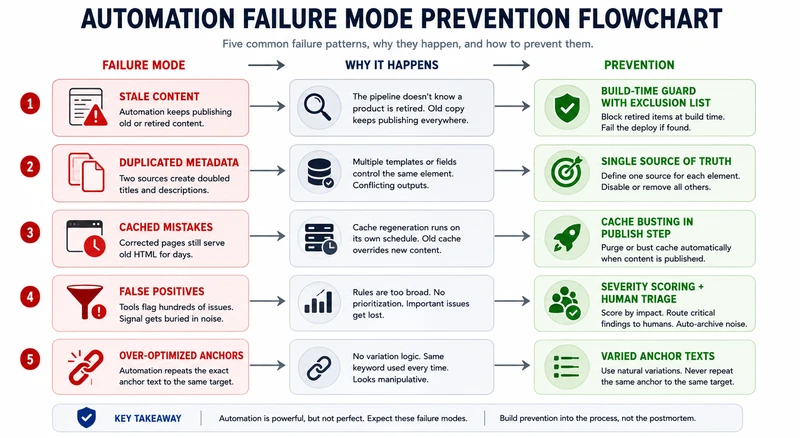
Five failure patterns emerge when automation goes wrong.
- Stale content that keeps publishing. An automation pipeline does not know a product is retired. Old copy keeps selling in every language. The fix is a build-time guard with an exclusion list that fails the deploy if retired offerings appear in any string.
- Duplicated metadata. Two sources of truth, a template and a hardcoded field, produce doubled titles. Pick exactly one source of truth per element.
- Cached mistakes that refuse to die. A corrected page serves old HTML for days because cache regeneration runs on its own schedule. Add cache busting to the publish step, not the postmortem.
- False positives at scale. A broken-link checker flags 200 URLs. Without human triage, the noise buries the signal. Add severity scoring. Route critical findings to a human and auto-archive the noise.
- Over-optimized anchors. Automated linkers repeat the exact target keyword every time. Vary anchors. Never repeat the same anchor text to the same target.
Automation ROI: When It Pays Off
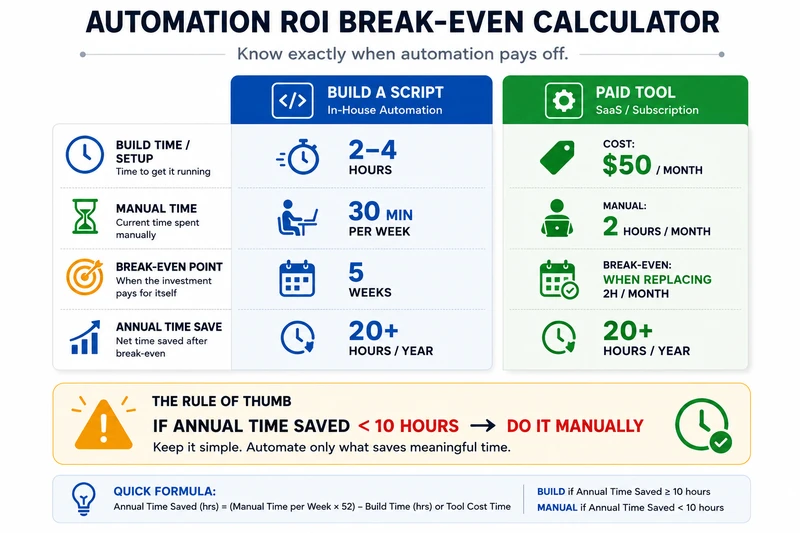
Build time for a Python automation script is two to four hours. A task taking 30 minutes per week manually breaks even at five weeks and saves 20+ hours per year. A $50 per month paid crawler breaks even when it replaces two hours of manual crawling each month. Run this before every automation investment. If annual time saved is under 10 hours, do it manually.
Frequently Asked Questions
What is the safest SEO task to automate?
Rank tracking and Search Console reporting. Zero failure risk, instant visibility, free API access from Google.
Should I automate content writing for my whole site?
Automate outlines and first drafts. Keep a human editor on the final version. Google treats low-effort content the same regardless of who or what wrote it.
How do I know if an automation is worth building?
Estimate manual time per week, multiply by 52, compare to setup cost. If annual saved time exceeds 10 hours, build it.
Can I automate technical SEO for AI search engines?
Yes. llms.txt generation, structured data injection, and AI crawler log analysis are fully automatable with deterministic rules and published specs.